Review any recorded call, not a random sample.
When call review is enabled, TaskQo records supported calls and meetings during shifts. Open a recording, press Transcribe, and see exactly what to coach.
7-day free trial · No card needed
What you get
Pick the calls that matter
Any recorded call can be reviewed, so you choose the ones that need attention instead of hoping a random sample catches the problem.
Scores you can explain
Each review scores communication, issue resolution and professionalism, and shows how the customer reacted.
Coaching tied to a moment
Coaching notes point to the exact time in the call, such as a discount offered before the objection was heard.
Transcripts in 39 languages
Speaker-labelled transcripts come in 39 languages, so teams that work in more than one language get the same review.
How it works
- 1
Turn on call review
Tell TaskQo where your team calls. Supported calls and meetings are then recorded during shifts, with both sides where the computer's sound can be captured.
- 2
Open a recording
Calls and meetings the desktop app recorded appear on the Calls page. Open one and press Transcribe.
- 3
Coach what you find
Read the transcript, the QA score and the coaching notes, then send the note to the team member who took the call.
What one click gives you
Random sampling means most calls are never heard. With TaskQo, any recorded call is ready for review. One click on a recording returns a speaker-labelled transcript, a QA score, the customer's reaction and coaching notes managers can act on.
- A speaker-labelled transcript in 39 languages
- A QA score for communication, issue resolution and professionalism
- The customer's reaction to the call
- Coaching notes linked to the time in the call
Calls reviewed in the language they happen in
TaskQo writes out who said what on every recorded call, in the language it was spoken, and translates it into English with one click. Urdu calls from a team in Pakistan are written in Roman Urdu, the way your team reads it. The review and coaching for each call are written in the call's language too.
Coaching that comes from the call itself
Every scored call shows what the person handled well, what could have gone better, the opportunities they missed and what to do next time. Managers turn that into a short coaching plan with weekly goals.
Recording that follows the law of the state you call
Tell TaskQo where your team calls. In states where everyone on a call must agree to recording, the other side is told first, either by your agent or by a short message your dialer plays. Until you choose, those calls are not recorded.
When a payment screen is open during a recorded call, that part of the call audio is silenced before it is kept.
Spend coaching time where it counts
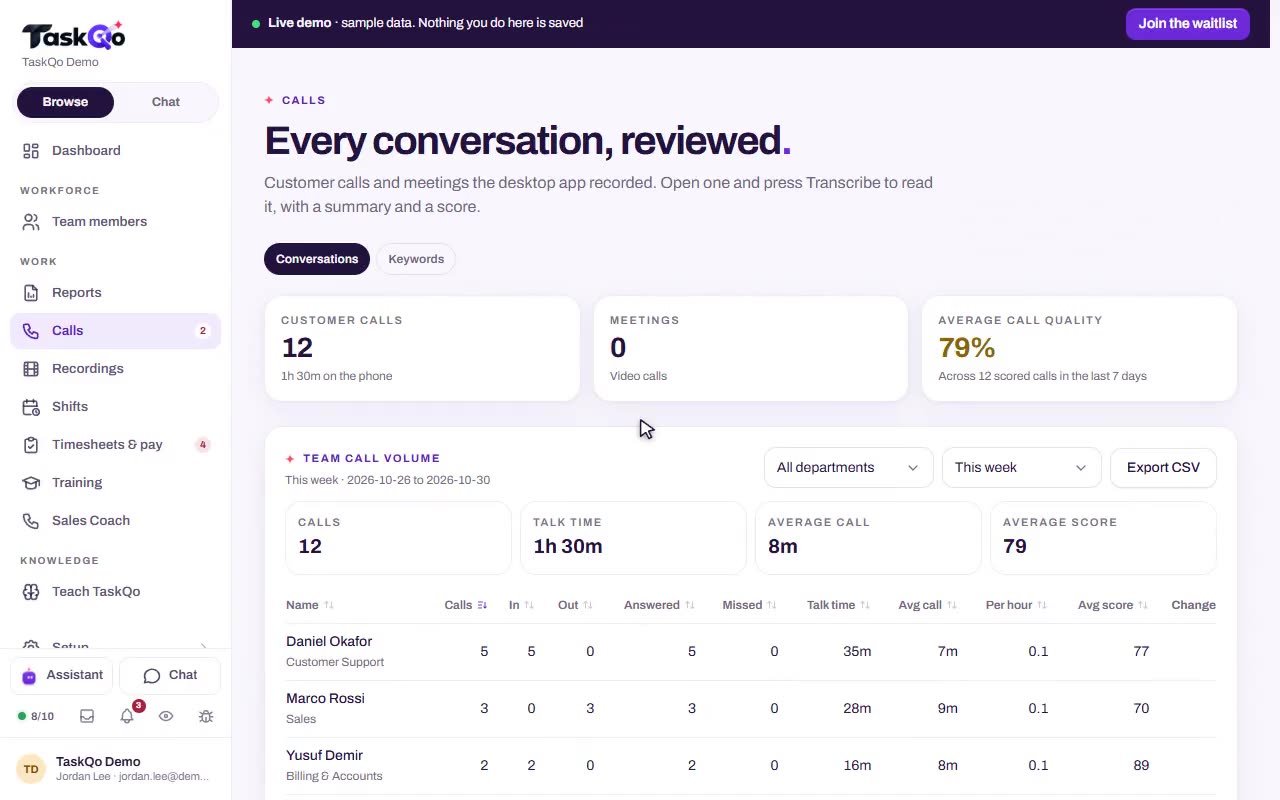
The Calls page puts customer calls and video meetings in one place, with time on the phone and the average call quality across scored calls. In the sample data, a Spanish call marked Needs attention shows the moment a discount came too early, with a suggested way to handle the price concern.
- Customer calls and video meetings in one list
- Average call quality across scored calls
- Calls marked when they need attention
Calls are recorded only during shifts and only when call review is enabled, and payment screens are silenced in the audio before it is kept.
Questions
Which calls does TaskQo record?
When call review is enabled, TaskQo records supported calls and meetings during shifts. Both sides are recorded where the computer's sound can be captured.
How do I get a transcript and a score?
Open any recording and press Transcribe. One click gives you the transcript, a QA score, the customer's reaction and coaching notes.
Which languages can be transcribed?
Transcripts are available in 39 languages, with each speaker labelled.
How does TaskQo handle call recording consent?
You tell TaskQo where your team calls. In states where everyone must agree, the other side is told before both sides are recorded, and until you choose, those calls are not recorded.